


 Tweet
Tweet
Why watch and listen on a PC?
You spend time in front of your PC - fancy watching TV in a small screen on your desktop while you work or surf? Or perhaps recording TV and radio onto your PC hard disk.
What you need...
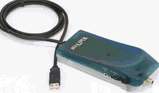 USB TV adapters
These small boxes plug into your PC or laptop's USB port. To get one of these working, you need to plug a TV aerial into the aerial socket on the TV adapter, and then plug the adapter's USB lead into a spare USB socket on your PC. USB TV adapters are supplied with a CD containing the software and drivers needed to get you up-and-running. Depending on the model you select, some boxes are powered from the USB socket, and some require external power (from a supplied external mains adapter). Some of the older units require you to connect a supplied lead into your sound card.
Pros: Easy to install and connect
Cons: More clutter - may need a separate power supply
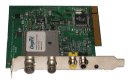 PCI card
The card plugs into a free PCI slot inside your computer. You'll need to have a spare PCI card inside your PC, and need to remove the case to fit it. It's then a case of plugging your TV aerial into the back of your PC (into the new aerial socket), and use the supplied TV software. The required software is supplied on CD, and needs to be installed before you can make use of the card.
Pros: Less boxes to have plugged into your USB ports
Cons: You'll need to open up your PC and fit it into a PCI slot (not for beginners)

Recording TV and radio on your PC

Watching Freeview digital TV on a Hauppauge Nova
Replace your video recorder?

Get a wider choice

7 day Freeview Electronic Programme Guide
 recommend: Hauppauge Nova-T USB2
Watch and record up to 50 channels of Freeview TV and radio channels on your PC. Plugs into your PC or laptop's USB port, and comes with a remote control. Great picture quality and a small size (150x100x30mm).
The Nova-T supports digital teletext, USB 2.0 and stereo audio.
Available from PC World (?59.99), Amazon (?49.99) or Novatech (?57.83) Available products
 Hauppauge WinTV Go
Summary: Basic reception of analogue TV - PCI card
This is a basic PCI card that allows you to watch TV on your PC. It doesn't have a built-in receiver for radio or digital TV or satellite, but is great for watching the main TV channels, or signals from a video recorder or Freeview/Sky set-top box that are connected via the aerial socket. It allows you to view and download Teletext, take still images/screenshots from TV broadcasts, and record short AVI video clips.
Available for ?22.78 from Amazon
Available for ?34.99 from Novatech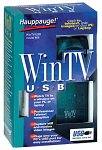 Hauppauge WinTV USB
Summary: Analogue TV reception - USB box
Receives standard analogue TV on your PC. Run either in full-screen mode making your PC monitor behave as a TV, or having a smaller TV screen sitting in the corner of your desktop while you work. Supports teletext and video recording. Some models come with FM radio and remote control.
Available for ?49.61 from Novatech
Available for ?59.95 from John Lewis
Available for ?46.67 from Amazon
Available with FM radio for ?41.50 from Amazon Hauppauge WinTV Nova
Summary: Freeview Digital TV - USB box
Receive Freeview digital TV on your PC. Run either in full-screen mode making your PC monitor behave as a TV, or having a smaller TV screen sitting in the corner of your desktop while you work. Digital teletext, digital radio (not DAB), plus video recording and MP2 audio capture. Flexible product, recommended by the Radio and Telly team.
Available for ?59.99 from PC World
Available for ?49.99 from Amazon
Available for ?57.83 from Novatech
PCI version for ?60.50 from Novatech Freecom Digital TV USB Stick
Summary: Freeview Digital TV
Designed for laptop use (but works on a desktop too), this small black adaptor plugs into a USB slot, and accepts a TV aerial to give you Freeview digital TV and radio. The supplied software supports scheduled recording and multi-channel preview. Although it's supplied with it's own aerial, you're unlikely to get impressive results without a proper TV aerial. Nice size and styling, and one of the best ways to get digital TV and radio on a laptop.
Available for ?37.99 from Amazon Hauppauge HVR1100 PCI card Recommended
Summary: Freeview / Analogue TV / FM
This card gives you some of the greatest flexibility. HVR stands for Hybrid Video Recorder, meaning that as well as receiving Freeview, it can also receive analogue TV as well as FM radio, so can be used for the free-to-air digital TV and radio channels, and can also be used the view /record the output of a video recorder or Sky box. Supplied with a remote control, this is a good buy - no USB version is available, so you'll need to install the PCI card into a spare slot inside your PC.
Available for ?71.79 from Amazon
Available for ?59.99 from PC World
Available for ?79.97 from Novatech Hauppauge HVR1100 PCI card Recommended
Summary: Freeview / Analogue TV / FM
This card gives you some of the greatest flexibility. HVR stands for Hybrid Video Recorder, meaning that as well as receiving Freeview, it can also receive analogue TV as well as FM radio, so can be used for the free-to-air digital TV and radio channels, and can also be used the view /record the output of a video recorder or Sky box. Supplied with a remote control, this is a good buy - no USB version is available, so you'll need to install the PCI card into a spare slot inside your PC.
Available for ?71.79 from Amazon
Available for ?59.99 from PC World
Available for ?79.97 from Novatech Hauppauge DEC2000-T
Summary: Freeview on PC and TV
Receive digital TV on your PC as well as your TV. Run either in full-screen mode making your PC monitor behave as a TV, or having a smaller TV screen sitting in the corner of your desktop while you work. This box also comes with a SCART output, so you can connect to a standard TV or video.
Available for ?49.97 from PC World
Available for ?107.75 from Novatech Hauppauge DEC3000-S
Summary: for Digital satellite
Hauppauge also sell a range of cards for viewing digital satellite via your PC. If you have a digital dish pointing at a suitable satellite, then you'll be able to watch (and record) the Free to Air channels onto your PC. Note that Sky TV encrypt their subscription channels, and decoding is only supported on their hardware - so don't expect to be able to use one of these boxes to view Sky subscription channels.
 Hauppauge Win TV PVR2
Summary: Record & watch Analogue TV - USB
Watch, Pause and Record TV on your PC, in a window or full screen. Listen to FM radio, too. Record TV shows or home videos to disk using high quality hardware MPEG-2 compression! Pause your TV shows, replay them at any time! . Includes ULead DVD MovieFactory! Plugs into your PC or laptop's USB 2.0 port (or USB 1.1) for easy installation. Also includes remote control.
Available for ?80.96 from PC World
Available for ?103.55 from Novatech
Available now priced ?80.96 from Amazon (PCI)
 Other Freeview products
As an alternative to the popular Hauppauge range featured above, there are a number of alternatives that might be worth checking out. As an example:
Curtessy: Radio and Telly
You spend time in front of your PC - fancy watching TV in a small screen on your desktop while you work or surf? Or perhaps recording TV and radio onto your PC hard disk.
What you need...
To get TV or radio signals on your PC, you'll need special hardware. PC TV 'cards' come in two key types. Some go inside your PC case (these are normally PCI cards), and some are external boxes that plug into your PC's USB port. Below is a summary of the important differences:
USB TV adaptersThese small boxes plug into your PC or laptop's USB port. To get one of these working, you need to plug a TV aerial into the aerial socket on the TV adapter, and then plug the adapter's USB lead into a spare USB socket on your PC. USB TV adapters are supplied with a CD containing the software and drivers needed to get you up-and-running. Depending on the model you select, some boxes are powered from the USB socket, and some require external power (from a supplied external mains adapter). Some of the older units require you to connect a supplied lead into your sound card.
Pros: Easy to install and connect
Cons: More clutter - may need a separate power supply
PCI cardThe card plugs into a free PCI slot inside your computer. You'll need to have a spare PCI card inside your PC, and need to remove the case to fit it. It's then a case of plugging your TV aerial into the back of your PC (into the new aerial socket), and use the supplied TV software. The required software is supplied on CD, and needs to be installed before you can make use of the card.
Pros: Less boxes to have plugged into your USB ports
Cons: You'll need to open up your PC and fit it into a PCI slot (not for beginners)
Recording TV and radio on your PC
Taking the most basic situation, let's assume you want to copy an extract from a video tape to an AVI file format on a computer. To do this, you'd use a co-ax fly lead to connect from the aerial 'out' of the video, into the co-ax socket input of the PC TV card. From the PC card software, you'll need to tune in the PC card to the signal from the video, so that you can get a clear picture. Then, use the video capture software supplied with the card, to capture the video you want.
Watching Freeview digital TV on a Hauppauge Nova
Replace your video recorder?
(Personal Video Recorder) and allows you to record shows onto a hard-disk within a satellite receiver. Well, you can do this cheaply using a PC card or USB box with the appropriate software. You can copy as many TV shows as your hard disk can hold, and burn them onto a You've probably heard of the Sky+ product. This is what's known as a PVR DVD if required. Features like unattended recording, pause live TV and instant rewind are available.
Take a look at the range of PC TV hardware below for some options.
Take a look at the range of PC TV hardware below for some options.
Get a wider choice
If you're into your TV or radio, consider getting a Digital TV (Freeview) PCI or USB box for your computer. This gives you access to around 50 new channels, including some excellent TV and radio from the BBC. You can also record TV or radio shows onto your PC. We find it useful to record shows from BBC7 from our Freeview Nova USB box, and copy them to an MP3player for listening on the move.
7 day Freeview Electronic Programme Guide
recommend: Hauppauge Nova-T USB2Watch and record up to 50 channels of Freeview TV and radio channels on your PC. Plugs into your PC or laptop's USB port, and comes with a remote control. Great picture quality and a small size (150x100x30mm).
The Nova-T supports digital teletext, USB 2.0 and stereo audio.
Available from PC World (?59.99), Amazon (?49.99) or Novatech (?57.83) Available products
Below is a summary of some of the key products available for your PC:
Hauppauge WinTV Go Summary: Basic reception of analogue TV - PCI card
This is a basic PCI card that allows you to watch TV on your PC. It doesn't have a built-in receiver for radio or digital TV or satellite, but is great for watching the main TV channels, or signals from a video recorder or Freeview/Sky set-top box that are connected via the aerial socket. It allows you to view and download Teletext, take still images/screenshots from TV broadcasts, and record short AVI video clips.
Available for ?22.78 from Amazon
Available for ?34.99 from Novatech
Hauppauge WinTV USBSummary: Analogue TV reception - USB box
Receives standard analogue TV on your PC. Run either in full-screen mode making your PC monitor behave as a TV, or having a smaller TV screen sitting in the corner of your desktop while you work. Supports teletext and video recording. Some models come with FM radio and remote control.
Available for ?49.61 from Novatech
Available for ?59.95 from John Lewis
Available for ?46.67 from Amazon
Available with FM radio for ?41.50 from Amazon
Hauppauge WinTV Nova Summary: Freeview Digital TV - USB box
Receive Freeview digital TV on your PC. Run either in full-screen mode making your PC monitor behave as a TV, or having a smaller TV screen sitting in the corner of your desktop while you work. Digital teletext, digital radio (not DAB), plus video recording and MP2 audio capture. Flexible product, recommended by the Radio and Telly team.
Available for ?59.99 from PC World
Available for ?49.99 from Amazon
Available for ?57.83 from Novatech
PCI version for ?60.50 from Novatech
Freecom Digital TV USB StickSummary: Freeview Digital TV
Designed for laptop use (but works on a desktop too), this small black adaptor plugs into a USB slot, and accepts a TV aerial to give you Freeview digital TV and radio. The supplied software supports scheduled recording and multi-channel preview. Although it's supplied with it's own aerial, you're unlikely to get impressive results without a proper TV aerial. Nice size and styling, and one of the best ways to get digital TV and radio on a laptop.
Available for ?37.99 from Amazon
Hauppauge HVR1100 PCI card Recommended Summary: Freeview / Analogue TV / FM
This card gives you some of the greatest flexibility. HVR stands for Hybrid Video Recorder, meaning that as well as receiving Freeview, it can also receive analogue TV as well as FM radio, so can be used for the free-to-air digital TV and radio channels, and can also be used the view /record the output of a video recorder or Sky box. Supplied with a remote control, this is a good buy - no USB version is available, so you'll need to install the PCI card into a spare slot inside your PC.
Available for ?71.79 from Amazon
Available for ?59.99 from PC World
Available for ?79.97 from Novatech
Hauppauge HVR1100 PCI card Recommended Summary: Freeview / Analogue TV / FM
This card gives you some of the greatest flexibility. HVR stands for Hybrid Video Recorder, meaning that as well as receiving Freeview, it can also receive analogue TV as well as FM radio, so can be used for the free-to-air digital TV and radio channels, and can also be used the view /record the output of a video recorder or Sky box. Supplied with a remote control, this is a good buy - no USB version is available, so you'll need to install the PCI card into a spare slot inside your PC.
Available for ?71.79 from Amazon
Available for ?59.99 from PC World
Available for ?79.97 from Novatech
Hauppauge DEC2000-TSummary: Freeview on PC and TV
Receive digital TV on your PC as well as your TV. Run either in full-screen mode making your PC monitor behave as a TV, or having a smaller TV screen sitting in the corner of your desktop while you work. This box also comes with a SCART output, so you can connect to a standard TV or video.
Available for ?49.97 from PC World
Available for ?107.75 from Novatech
Hauppauge DEC3000-S Summary: for Digital satellite
Hauppauge also sell a range of cards for viewing digital satellite via your PC. If you have a digital dish pointing at a suitable satellite, then you'll be able to watch (and record) the Free to Air channels onto your PC. Note that Sky TV encrypt their subscription channels, and decoding is only supported on their hardware - so don't expect to be able to use one of these boxes to view Sky subscription channels.
- DEC3000-S - use your PC to record TV and radio. Comes with remote control
- WinTV-NEXUS-S - PCI card with for digital satellite TV, satellite radio and videotext
- WinTV-NOVA-S - PCI and USB versions with
Hauppauge Win TV PVR2Summary: Record & watch Analogue TV - USB
Watch, Pause and Record TV on your PC, in a window or full screen. Listen to FM radio, too. Record TV shows or home videos to disk using high quality hardware MPEG-2 compression! Pause your TV shows, replay them at any time! . Includes ULead DVD MovieFactory! Plugs into your PC or laptop's USB 2.0 port (or USB 1.1) for easy installation. Also includes remote control.
Available for ?80.96 from PC World
Available for ?103.55 from Novatech
Available now priced ?80.96 from Amazon (PCI)
Other Freeview products As an alternative to the popular Hauppauge range featured above, there are a number of alternatives that might be worth checking out. As an example:
- The AverMedia range- See the range at Misco and www.maplin.co.uk (under the 'Computers', 'Build your own' section).
- Xpert V-Stream VS-DVBT. Available from Maplin.co.uk - Cat No A75BZ (PCI version) and A78BZ (USB version)
Curtessy: Radio and Telly


Comment