


 Tweet
Tweet
How To Use A Forum [Must Read If U Dont Know About Forums]
1. Why should I register?
In order to fully utilize the abilities of this forum, the administrator will probably require that you register as a member. Registration is free, and allows you to do the following:
To register, you will need to specify a username and password, and a valid email address. Entering your email address will not leave you open to 'spam', as you can choose to hide your email address, and messages sent to you via email do not reveal your address to the sender in any case. (To verify this, you can try sending an email message to another user.) The administrator may have configured the forum to send you the final part of the registration process by email, so ensure that the email address you provide is valid and working.
If you are under the age of 13, the administrator may require that a parent or guardian provides consent before allowing you to complete the registration process. More information about this is available during the registration process.
2. I lost my password, what can I do?
If you forget your password, you can click on the 'Forgotten Your Password' link on any page that requires you to fill in your password.
This will bring up a page where you should enter your registered email address, and an email will be sent to that address instantly, with instructions for resetting your password.
3. How to make threads or post in a forum?
first thing to do is to check to see if the post has already been posted by someone else if not lets get started.
go to the appropriate forum ie music,movies etc then click on the new post button
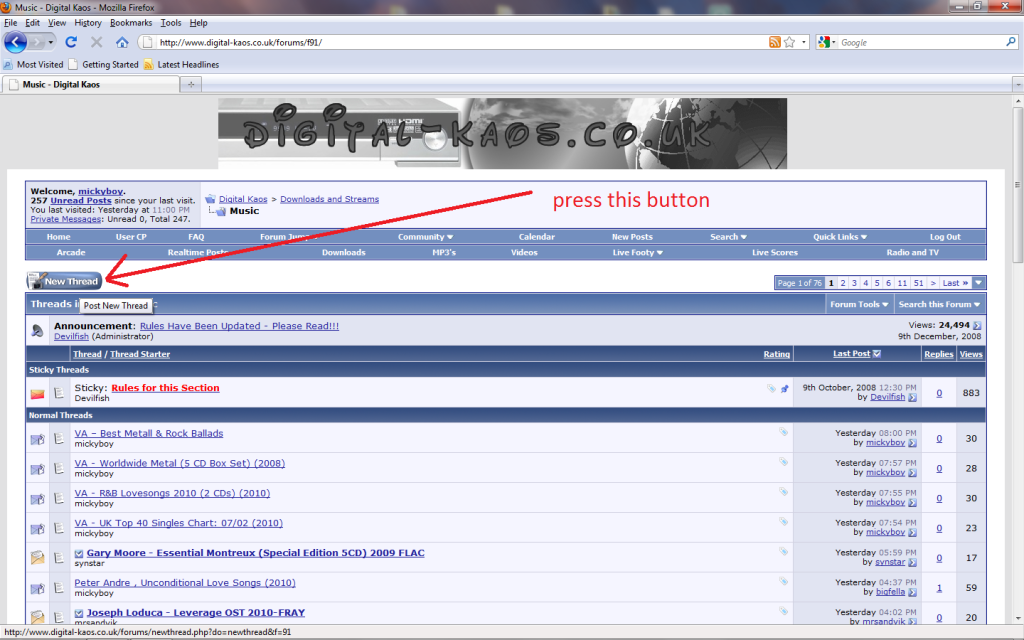
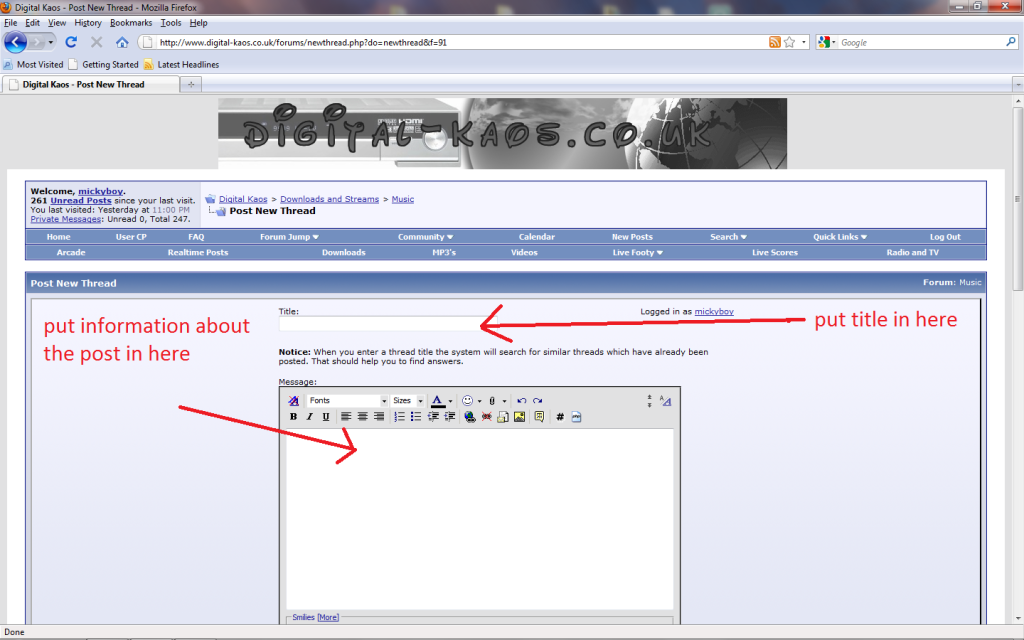
next you will see a box like this , put the title of the post in where it says title,then post some information about the post in the big box
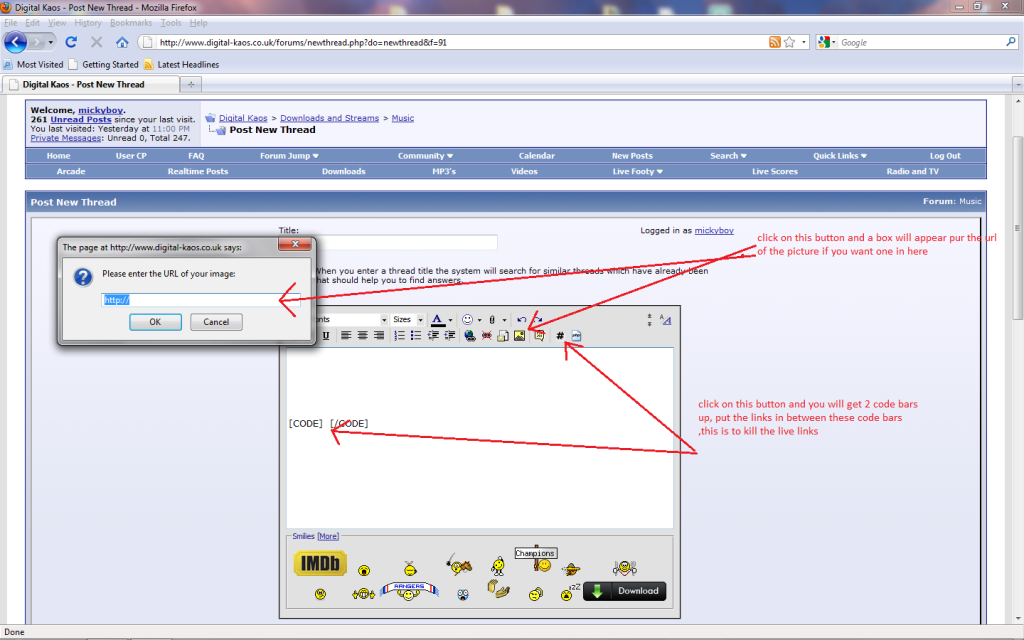
you could add a picture for the post by following the diagram below ,,also you will see a button to add code tags ,these code tags are used to kill the live links ,click on the code button as below and put your links in between the 2 code tags
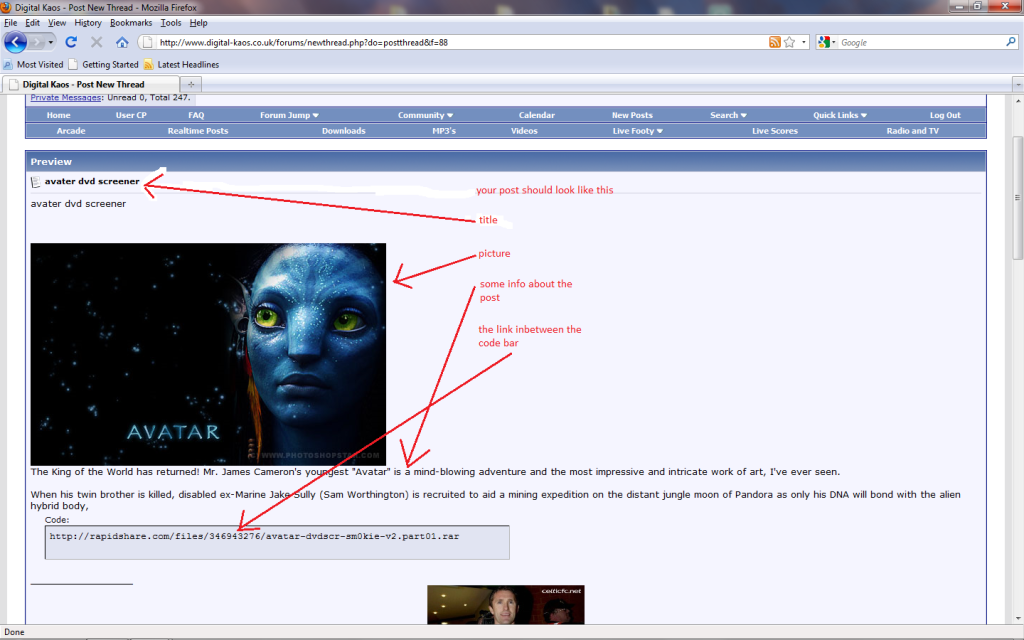
your finished post should look something like this below
4. How do I get a picture under my username?
These small images are called Avatars. They are displayed below your username on all posts that you make. There are two kinds of avatars: those provided by the ukindian administrator and those that you upload yourself.
If the administrator has provided a set of avatars, and avatars are enabled, you may select an avatar that best describes your personality.
The administrator may also have enabled custom avatars, which allows you to upload an avatar image from your computer.
5. What is the signature for?
After you have registered, you may set your signature. This is a piece of text that you would like to be inserted at the end of all your posts, a little like having headed note paper.
If the ukindian administrator has enabled signatures, then you will have the option to include your signature on any posts you make. If you have specified a signature, then the forum will automatically append your signature to any messages you post. You can disable signatures on a per-post basis by un-ticking the 'Show Signature' checkbox when you compose your message.
You may turn the signature on and off on posts you have already made by editing the post and altering the state of the 'Show Signature' option.
You can set your signature by editing your profile.
6.How can I change the information in my profile?
It is your responsibility to keep the information in your profile up-to-date. You should especially ensure that your email address is kept current. You can alter any of the fields in your profile, except your username. Once you have registered your username, it becomes yours for life. In extreme circumstances, you may request that the ukindian administrator change your username, but he or she will require a very good reason to do so.
7. Does this forum use cookies?
The use of cookies on this forum is optional, but may enhance your experience of the site. Cookies are used to enable functions such as showing whether or not a thread or forum you are viewing has new posts since your last visit, or to automatically log you back in when you return to the site after being away for a while. When you register, you will be given the option to 'Automatically login when you return to the site'. This will store your username and password in a cookie, stored on your computer. If you are using a shared computer, such as in a library, school or internet cafe, or if you have reason to not trust any other users that might use this computer, we do not recommend that you enable this. This forum also gives you the option to use a cookie to track your current session, ensuring that you remain logged-on while browsing the site. If you choose not to store this information in a cookie, the session data will be sent through each link you click. Choosing not to use a cookie may cause problems if your computer's connection to the Internet uses a proxy-server and you share links with other users behind the same proxy. If in doubt, we recommend that you select 'yes' to enable the cookie. After you have registered, you may alter your cookie options at any time by changing the settings on this page.
8.How do I clear my cookies?
In Internet Explorer 6 on Windows XP:
In Mozilla Firefox:
Your cookies should now be removed. You may want to restart the computer and revisit the forums to be sure.
 WEINDIANS ADMIN TEAM
1. Why should I register?
In order to fully utilize the abilities of this forum, the administrator will probably require that you register as a member. Registration is free, and allows you to do the following:
- Post new threads
- Reply to other peoples' threads
- Edit your posts
- Receive email notification of replies to posts and threads you specify
- Send private messages to other members
- Enter events in the forum calendar
- Set up a 'buddy-list' to quickly see which of your friends are currently online
To register, you will need to specify a username and password, and a valid email address. Entering your email address will not leave you open to 'spam', as you can choose to hide your email address, and messages sent to you via email do not reveal your address to the sender in any case. (To verify this, you can try sending an email message to another user.) The administrator may have configured the forum to send you the final part of the registration process by email, so ensure that the email address you provide is valid and working.
If you are under the age of 13, the administrator may require that a parent or guardian provides consent before allowing you to complete the registration process. More information about this is available during the registration process.
2. I lost my password, what can I do?
If you forget your password, you can click on the 'Forgotten Your Password' link on any page that requires you to fill in your password.
This will bring up a page where you should enter your registered email address, and an email will be sent to that address instantly, with instructions for resetting your password.
3. How to make threads or post in a forum?
first thing to do is to check to see if the post has already been posted by someone else if not lets get started.
go to the appropriate forum ie music,movies etc then click on the new post button
next you will see a box like this , put the title of the post in where it says title,then post some information about the post in the big box
you could add a picture for the post by following the diagram below ,,also you will see a button to add code tags ,these code tags are used to kill the live links ,click on the code button as below and put your links in between the 2 code tags
your finished post should look something like this below
4. How do I get a picture under my username?
These small images are called Avatars. They are displayed below your username on all posts that you make. There are two kinds of avatars: those provided by the ukindian administrator and those that you upload yourself.
If the administrator has provided a set of avatars, and avatars are enabled, you may select an avatar that best describes your personality.
The administrator may also have enabled custom avatars, which allows you to upload an avatar image from your computer.
5. What is the signature for?
After you have registered, you may set your signature. This is a piece of text that you would like to be inserted at the end of all your posts, a little like having headed note paper.
If the ukindian administrator has enabled signatures, then you will have the option to include your signature on any posts you make. If you have specified a signature, then the forum will automatically append your signature to any messages you post. You can disable signatures on a per-post basis by un-ticking the 'Show Signature' checkbox when you compose your message.
You may turn the signature on and off on posts you have already made by editing the post and altering the state of the 'Show Signature' option.
You can set your signature by editing your profile.
6.How can I change the information in my profile?
It is your responsibility to keep the information in your profile up-to-date. You should especially ensure that your email address is kept current. You can alter any of the fields in your profile, except your username. Once you have registered your username, it becomes yours for life. In extreme circumstances, you may request that the ukindian administrator change your username, but he or she will require a very good reason to do so.
7. Does this forum use cookies?
The use of cookies on this forum is optional, but may enhance your experience of the site. Cookies are used to enable functions such as showing whether or not a thread or forum you are viewing has new posts since your last visit, or to automatically log you back in when you return to the site after being away for a while. When you register, you will be given the option to 'Automatically login when you return to the site'. This will store your username and password in a cookie, stored on your computer. If you are using a shared computer, such as in a library, school or internet cafe, or if you have reason to not trust any other users that might use this computer, we do not recommend that you enable this. This forum also gives you the option to use a cookie to track your current session, ensuring that you remain logged-on while browsing the site. If you choose not to store this information in a cookie, the session data will be sent through each link you click. Choosing not to use a cookie may cause problems if your computer's connection to the Internet uses a proxy-server and you share links with other users behind the same proxy. If in doubt, we recommend that you select 'yes' to enable the cookie. After you have registered, you may alter your cookie options at any time by changing the settings on this page.
8.How do I clear my cookies?
In Internet Explorer 6 on Windows XP:
- Click the "Tools" menu.
- Select "Internet Options" from the menu that appears.
- Click "Delete Cookies" on the dialog box that appears. It will be in the center area of the "General" tab.
In Mozilla Firefox:
- Click the "Tools" menu.
- Select "Options" from the menu that appears.
- From the dialog box, select "Privacy" on the left.
- Find "Cookies" on the main pane, and click the "Clear" button adjacent to it.
Your cookies should now be removed. You may want to restart the computer and revisit the forums to be sure.
WEINDIANS ADMIN TEAM


 �-)��O.o���]״)���


Comment